
P1.8 vs P2 LED Display: Which Should You Choose?
P1.8 and P2 are two common fine-pitch LED display options for indoor installations. This guide compares their pixel density, viewing distance, applications and key selection factors for Malaysian corporate, government and commercial projects.
When selecting an indoor LED screen, pixel pitch is one of the most important specifications to consider. P1.8 and P2 are two common fine-pitch LED display options for indoor installations.
Both can be used in corporate spaces, government meeting rooms, auditoriums, presentation halls and other professional environments. However, they differ in pixel spacing and pixel density.
Choosing between them depends on viewing distance, screen dimensions, content requirements, installation conditions and project budget. This guide explains the differences and helps readers evaluate which specification is appropriate for their installation. For a broader overview of pixel pitch across all common sizes, see our LED Screen Pixel Pitch Guide.
What Is the Difference Between P1.8 and P2?
Pixel pitch describes the centre-to-centre distance between adjacent LED pixels, measured in millimetres. P1.8 has a nominal pixel pitch of approximately 1.8 mm, while P2 has a nominal pixel pitch of approximately 2.0 mm.
Because the pixels are positioned closer together, P1.8 generally provides higher pixel density. P2 has slightly wider pixel spacing but can still provide high-resolution visual performance when selected for an appropriate viewing distance.
Technical note: Actual pixel pitch may vary slightly by product or manufacturer. Confirm the actual specifications using the manufacturer's data sheet. Not every product labelled P1.8 will have exactly the same physical pitch.
P1.8 vs P2 LED Display Comparison
The table below summarises the key differences between P1.8 and P2 LED displays across the specifications most relevant to indoor installations.
| Specification | P1.8 | P2 |
|---|---|---|
| Nominal Pixel Pitch | Approximately 1.8 mm | Approximately 2.0 mm |
| Pixel Density | Higher | Slightly lower |
| Close Viewing | Suitable for applications requiring finer image detail | Suitable for many indoor applications when viewing conditions are appropriate |
| Typical Applications | Boardrooms, control rooms, premium presentation spaces | Auditoriums, meeting rooms, government halls, presentation spaces |
| Screen Resolution | More pixels within the same physical display area, assuming the stated pitches are exact | Fewer pixels within the same physical display area |
| Cost Considerations | Pricing depends on product, quality and system specification | Pricing also depends on product, quality and system specification |
Viewing Distance: P1.8 vs P2
Viewing distance plays an important role in pixel pitch selection. P1.8 may be useful where audiences are seated relatively close to the display or where fine image detail is a priority. P2 can be an appropriate choice for meeting rooms, auditoriums, presentation halls and other indoor installations.
The difference in perceived sharpness also depends on the content being displayed and the viewer's position. A display used for small text, technical information or detailed presentations may benefit from greater pixel density. A large-format display viewed from further away may not require the smallest available pixel pitch.
A common industry guideline suggests that the comfortable viewing distance in metres is roughly equal to the pixel pitch in millimetres — so a P1.8 screen may look seamless from around 1.8 m, and a P2 screen from around 2 m. However, this should not be treated as a fixed engineering rule. The actual installation environment should always be assessed on site.
Pixel Density and Screen Resolution
A smaller pixel pitch generally allows more pixels within the same physical display area. This can be beneficial when displaying detailed graphics, presentation materials, small text and video content.
The native resolution of an LED screen is calculated from its physical dimensions and pixel pitch:
Horizontal resolution = Screen width (mm) ÷ Pixel pitch (mm)
Vertical resolution = Screen height (mm) ÷ Pixel pitch (mm)
For example, a screen 1,920 mm wide at P2 has a horizontal resolution of 960 pixels. The same width at P1.8 has a horizontal resolution of approximately 1,067 pixels. Actual screen dimensions must also be compatible with the manufacturer's module and cabinet system — not every physical screen dimension is compatible with both pixel pitches.
Which Applications Are Suitable for P1.8?
P1.8 may be considered in environments where close viewing and fine image detail are important, including:
- •Corporate boardrooms
- •Executive meeting rooms
- •Control rooms
- •Premium presentation spaces
- •Detailed information displays
- •Selected auditorium installations
Actual suitability depends on screen dimensions, content requirements and viewing conditions. Learn more in our Fine Pitch LED Display Solutions guide.
Which Applications Are Suitable for P2?
P2 can provide a practical balance between pixel density, screen size, viewing conditions and system design for suitable indoor applications, including:
- •Government meeting halls
- •Corporate presentation rooms
- •Auditoriums
- •Universities
- •Conference spaces
- •Multipurpose indoor halls
- •Large-format indoor installations
P2 is not automatically the best specification for every auditorium — the final choice should reflect the actual venue. Explore our Indoor LED Display Solutions for more information.
Real P2 Indoor LED Installation Projects in Malaysia
The following are two genuine P2 indoor LED installations completed by LEDSCREEN.ASIA in Malaysia. Both projects use P2 LED technology — they are presented here as real-world examples, not as P1.8 installations.

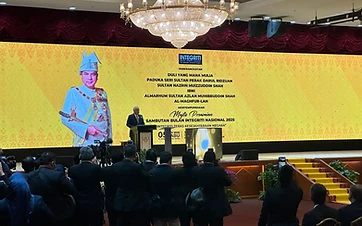
P2 Indoor LED Screen — SUK Perak Dewan Banquet
Our P2 indoor LED installation at SUK Perak Dewan Banquet features a large 21.12m × 3.84m display with a native resolution of 10,560 × 1,920 pixels. This project demonstrates the application of P2 LED technology in a large-format indoor government venue used for official functions and presentations.

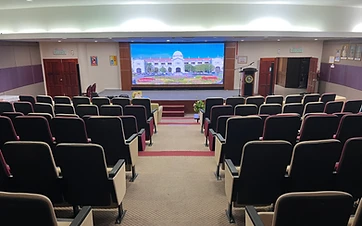
P2 Indoor LED Screen — Majlis Daerah Kampar
At Majlis Daerah Kampar, LEDSCREEN.ASIA installed a 4.48m × 1.92m P2 indoor LED screen with a native resolution of 2240 × 960 pixels. The installation replaced the existing projector system and provides a large-format digital display for government meetings, presentations and official functions.
Other Factors to Consider Beyond Pixel Pitch
Pixel pitch should not be the only purchasing criterion. The following factors are equally important when evaluating an indoor LED display:
- 01Actual viewing distance
- 02Physical screen dimensions
- 03Required native resolution
- 04Content type and text readability
- 05Brightness and indoor lighting
- 06Refresh rate
- 07Viewing angle
- 08LED technology and product quality
- 09Cabinet and maintenance design
- 10Video processing and configuration
- 11Installation environment
- 12Project budget and long-term maintenance
There is no universal refresh-rate requirement, and P1.8 and P2 do not have fixed or identical brightness. Actual specifications depend on the selected LED product and system configuration.
How to Choose Between P1.8 and P2 LED Displays
When evaluating which specification is appropriate, customers should consider:
- •How close will viewers sit to the display?
- •Will the content include small text or detailed graphics?
- •How large will the finished LED screen be?
- •What native resolution is required?
- •What is the available budget?
- •How will the display be installed and maintained?
Neither pixel pitch should be selected based solely on its nominal number. A professional assessment using actual site conditions and verified product specifications is recommended. Browse our completed LED projects for real installation examples.
Need Help Selecting an Indoor LED Screen in Malaysia?
Not sure whether your project requires P1.8, P2 or another fine-pitch LED display? LEDSCREEN.ASIA provides consultation, supply, installation, configuration, testing, training and technical support for professional LED display installations in Malaysia. Contact our team to discuss your viewing distance, screen dimensions, application and installation requirements.
Or call us directly at +60 18-577 6517
Frequently Asked Questions
Related LED Display Resources
LED Screen Pixel Pitch Guide
A broader guide to pixel pitch selection from P1.25 to P5 in Malaysia.
Learn moreFine Pitch LED Display Solutions
High-resolution indoor LED walls for close-viewing applications.
Learn moreIndoor LED Display Solutions
Indoor LED screens for conference, government and venue installations.
Learn moreCompleted LED Projects
Browse real LED display installations completed across Malaysia.
Learn more